
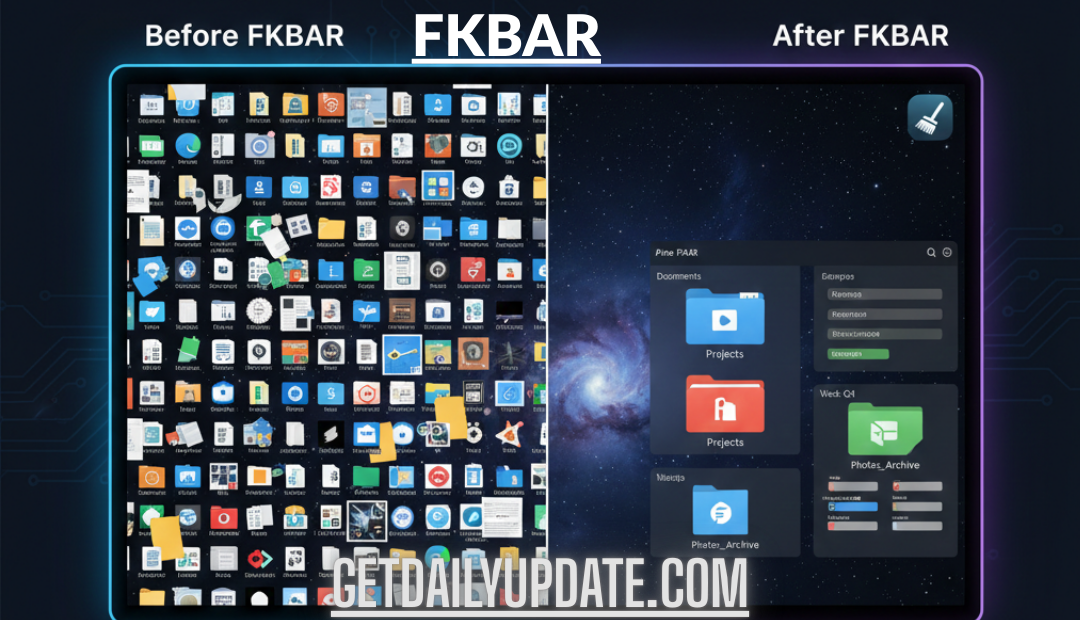
We’ve all been there. You sit down to do some focused work, only to be greeted by a desktop so crowded you can’t even see the wallpaper. Or maybe you open your email and feel your eye twitch at the 12,345 unread messages staring back at you.
For a long time, I ignored it. I told myself digital mess didn’t matter because I couldn’t physically see it like a pile of laundry. But I was wrong. The challenge is that digital mess doesn’t stare you in the face the way physical clutter does, says wellbeing coach Adrienne Adhami. You can ignore it for longer, but it still drains your mental energy .
That low-level hum of anxiety? The feeling of being overwhelmed before you’ve even started your day? That’s the cost of digital clutter. We need a way to fight back that’s simple, memorable, and effective. That’s why I created FKBAR.
Think of it as your digital decluttering Swiss Army knife. It’s a five-step framework designed not just to clean up your mess, but to eliminate digital clutter at its source. Let’s dive in.
What is FKBAR? Your 5-Step Framework to Digital Peace
FKBAR stands for Find, Kill, Backup, Automate, and Review. It’s a cyclical process that moves you from chaos to control, and then helps you stay there. It doesn’t require you to be a tech wizard—just someone who is tired of the noise.
F is for “Find” (and File)
The first step isn’t deleting everything in sight. That’s a recipe for disaster (and regret). Instead, we need to assess the damage. As productivity coach Amanda Jefferson suggests, start with a “brain dump”—write down the issues: overflowing email, a messy desktop, forgotten passwords .
Go through your main hotspots:
-
Desktop: Take a screenshot. That chaotic image is your “before” picture.
-
Downloads Folder: This is usually a digital black hole. Open it and sort by date.
-
Email Inbox: Scroll through and identify the biggest offenders—newsletters, old threads, spam.
The Action: For every file or email you want to keep, Find it a new home. Create a logical folder structure. On your computer, use broad categories like Archives, Projects, Personal. In your email, create folders like Action Required, Waiting On, and Reference . The goal isn’t perfection; it’s giving everything a place to live.
K is for “Kill” the Clutter
Now for the satisfying part. Once you’ve identified what matters and given it a home, it’s time to be ruthless with the rest. Digital clarity isn’t about organization—it’s about elimination .
-
Unsubscribe Ruthlessly: Go through your email and unsubscribe from every newsletter, promotion, and alert you don’t actively read. (Pro tip: Search “unsubscribe” in your inbox to see them all at once).
-
Delete Duplicates & Blur: Our phones are packed with five similar shots of the same thing. Keep the best, delete the rest. Be honest—if it’s blurry or a screenshot of a meme from 2022, let it go .
-
Remove Unused Apps: If you haven’t opened an app in the last three months, you won’t miss it. On average, people have over 18 apps on their phones, many of which just slow things down and add visual noise .
-
Close Those Tabs: Right now, close any tab you haven’t looked at in the last 24 hours. If it’s important, bookmark it or use a tool like Pocket. Research shows that too many open tabs overload the brain .
Caption: Be ruthless. If you haven’t used it recently, it’s just noise.
B is for “Backup” (Create Your Base)
Before we go further, we need a safety net. One of the biggest reasons we hoard digital files is the fear of deleting something we might need later . A solid backup system removes that fear.
You need a “Base” of operations. This is usually a cloud service like Google Drive, iCloud, or Dropbox, or an external hard drive.
The Action:
-
Create a “The Safe” Folder: In your cloud drive, create a folder for absolute essentials: scans of passports, leases, warranties, and tax returns.
-
Sync Your Photos: Ensure your phone is backing up photos to the cloud. This gives you the confidence to delete them from your device storage.
-
Use the Cloud Wisely: Remember, the cloud can just become another messy junk drawer if you’re not careful. Use it for storage, not as a dumping ground .
A is for “Automate” the Process
If you have to manually file every single piece of digital information, you’re going to burn out. We need to set up systems that do the heavy lifting for us. This is how we prevent clutter from coming back.
-
Email Filters: This is a game-changer. In Gmail or Outlook, set up filters so that any email from a specific sender (like your bank) skips the inbox and goes straight to a “Bills” folder. Send all newsletters to a “To Read” folder that you check once a week .
-
Turn Off Notifications: Do you really need to know the moment someone likes your post? Go into your settings and turn off all non-essential notifications. Something as simple as turning off notifications can feel like a digital declutter .
-
Consolidate Tools: Do you have three different apps for note-taking? Pick one (like Notion, Evernote, or Apple Notes) and stick with it .
R is for “Review” (The Habit Loop)
Here is the truth no one likes to admit: Decluttering isn’t a one-and-done event. Like maintaining a garden, you have to do little bits of maintenance often.
Set a reminder on your calendar for the last Friday of every month. Call it “FKBAR Friday” or “Digital Sweep Day.” Spend just 15-30 minutes doing a quick review.
-
Daily: Delete junk email, clear a few photos .
-
Weekly: Empty your downloads folder, tidy your desktop.
-
Monthly: Unsubscribe from new email lists, review your apps, check your cloud backup .
This routine maintenance is what separates a permanently tidy digital space from one that slides back into chaos.
Personal Insight: Why I Stopped “Organizing” and Started “Eliminating”
For years, I was a master organizer. I had folders within folders. My email was color-coded. But I still felt stressed. It took me a long time to realize that I was just neatly arranging things I never needed in the first place.
I was treating the symptom, not the disease. The disease was digital hoarding. The cure wasn’t better organization—it was elimination. Now, when I apply the FKBAR method, I focus heavily on the “Kill” step. If I don’t need it for taxes or a current project, it goes. My motto now is: “When in doubt, delete it out.” You can almost always find it again if you absolutely need it, but 99% of the time, you won’t.
Conclusion: Your Digital Life, Simplified
Digital clutter is a silent productivity killer and a major source of modern anxiety. It slows down your devices and, more importantly, it slows down your brain. But you don’t have to live with it.
By following the FKBAR method—Find, Kill, Backup, Automate, and Review—you can take back control. Start small. Pick one area today. Maybe it’s just your desktop or your phone’s camera roll. Apply the steps, and notice how much lighter you feel.
I’d love to hear which area of your digital life is the biggest mess. Drop a comment below and let me know—is it your email, your photos, or something else? And if you found this guide helpful, please share it with a friend who needs a digital detox!




Leave a Reply